

The radical overhaul of its Gemini application is a bold move by Google to signify to the world what to expect regarding the future of artificial intelligence in terms of how people will interact with it on a daily basis. The company has been secretively polishing the interface over the last few months, and now the entire revamp is done, providing a more unified, intuitive and visually engaging experience. This redesign is a more profound approach by Google to make AI less of a tool and more of a natural continuation of normal online behavior.
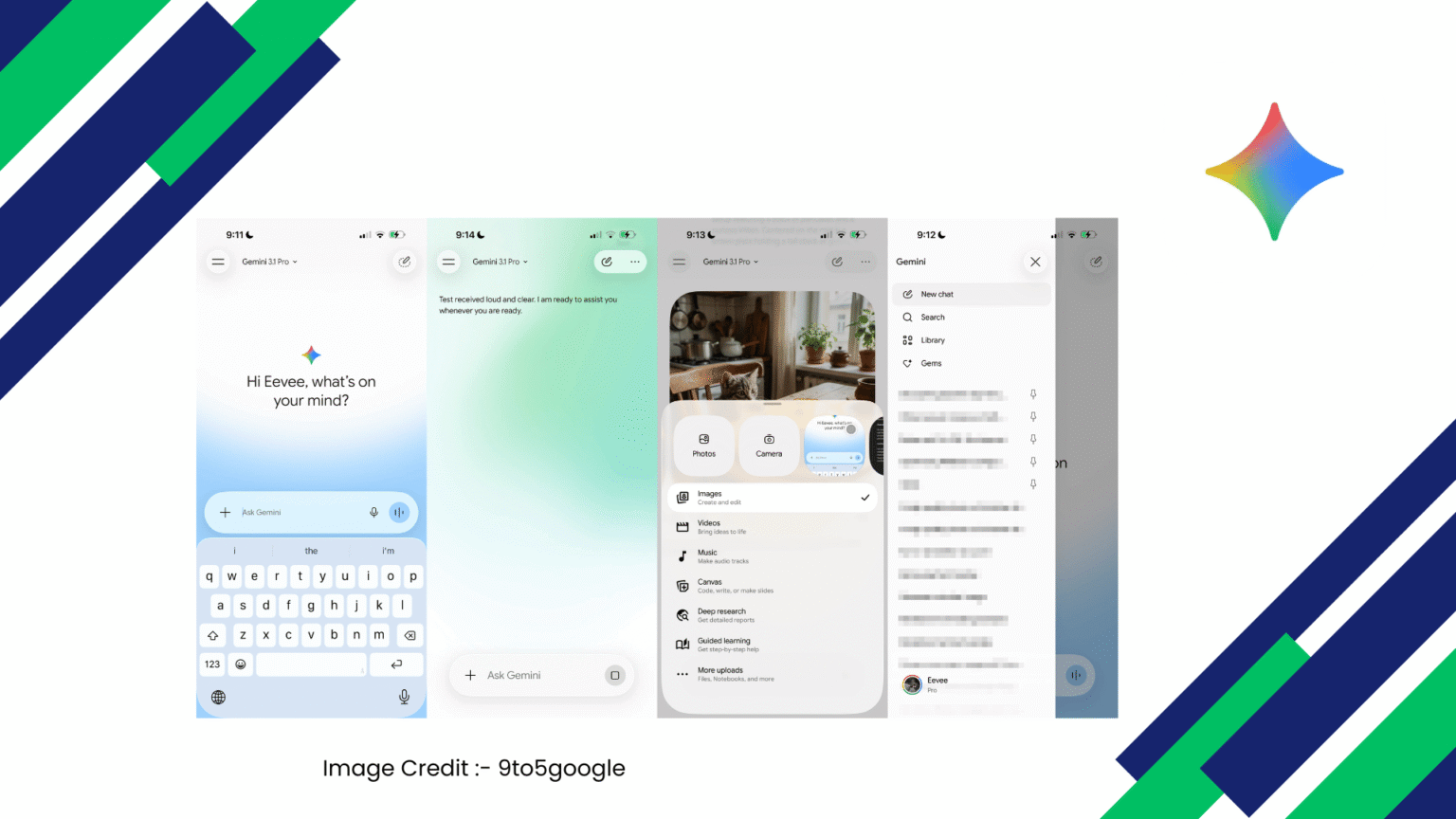
Among the most apparent transformations, the one that becomes immediately evident is the one that makes the homepage. The old-fashioned interface has been substituted by a more simplified, more focused interface with a pill-shaped prompt box. This design solution is not a coincidence, it makes one focus on the main activity of the program: communication with AI. Google is promoting users to work more सahajly, without distractions by simplifying the visual hierarchy. The prompt box has become the center point and it is quite apparent that all this is started by a question, command or idea.
The voice input and the Gemini Live will be quickly accessible to the right of this input field, furthering the push that the app will have towards more dynamic and conversational interactions. Rather than type, users can speak naturally, and it is a bigger trend in the AI interface where voice is becoming equally as important as text. Such a minor yet meaningful placement reveals that Google is making accessibility and convenience of use a priority.
The other significant addition is the addition of the plus button that opens a bottom sheet that contains a carousel of options. This comes with easy access to Photos, Camera, and other recent images, Files, Notebooks, and other uploading options. Instead of dispensing these features in various menus, the redesign will now all be under one roof. This cohesive solution will eliminate friction and enable users to move between various forms of input, such as text, images, and documents, without feeling lost.
Under this section, tools are displayed in an organized list with each being described briefly. These tools are Images, Videos, Music, Canvas, Deep Research and Guided Learning. Google is making advanced AI capabilities more accessible by simply labeling each of its functions. Users are no longer required to make the guess as to what a feature does; they are guided towards exploring new possibilities. In particular, beginners can be overwhelmed by the complexity of AI tools, which is especially important.
Another aspect that the redesign brings is the a more personalized and welcoming tone. The greeting these days, now situated on the screen, is a conversational entry point. Above it is the Gemini spark icon which is a subtle reinforcement of brand identity. The given human-like greeting is a part of a bigger project to make AI interactions feel more natural and less mechanical. It turns the app into more of a utility rather than something that feels more like a digital companion.
The most obvious visual alteration is the introduction of a colorful and pulsating gradient background. This dynamic design feature provides an impression of movement and vitality to the interface. Rather than a plain screen, they are welcomed to a living and breathing environment, which responds to their presence. This is in line with the current trends in design where a small animation can be used to engage the user without being too overpowering.
The navigation has also been reconsidered. The model picker has been returned to the top-left corner, and it is now represented as a dropdown menu. This allows changing between various AI models, yet does not clutter the interface. Meanwhile, the icon set has been revised with thinner, rounded edges, and the app has a more modern appearance.
Interestingly, the navigation drawer has undergone a significant change as well. The account switcher, which is typically placed at the top in many apps, has been moved to the bottom. This break with tradition is an indication that Google is trying out novel methods of giving priority to content rather than settings. The app has a cleaner and more focused design by pushing less frequently used options out of the main view.
The other minor yet significant aspect is the temporary chat button. This will enable users to initiate conversations that are not fixed into place, which gives them greater control of privacy and organization. Such features can significantly differ in user trust given the growing significance of data management in an era.
The most interesting thing about this redesign is that it is similar regardless of platform. Google is currently testing this single interface on both Android and desktop web, and is already live on Mac. This is a cross platform strategy that will see users having more or less similar experience despite what device they are using. It embodies a larger vision of establishing a smooth AI ecosystem that can adjust to various situations but still remain itself.
In addition to the aesthetical and functional additions, this redesign is a strategic step in the competitive AI environment. As the number of companies building AI assistants increases, user experience is a major differentiator. No longer can it be just a matter of having powerful models but how the users interact with the models is also a matter of concern. With its emphasis on simplicity, clarity and engagement, Google is making Gemini an accessible and yet powerful tool that will be of use to a very broad audience of users.
The new Gemini app is fundamentally about simplifying things and increasing capability. It integrates various types of interaction-text, voice, images, and files-into one, unified interface. It provides easy navigation with user-friendly designs and also provides the user with greater functionality in case he/she wants to dive deeper.
To a large extent, this redesign is an indication of the future of AI interfaces. It does not bombard the users with choices but silently arranges them. It does not require one to pay attention; it welcomes interaction. and, rather than being like a separate tool, it becomes a part of the natural rhythm of digital life.
Through this redesign, Google is not merely revamping an application, but reshaping how individuals interact with AI.