

Google has officially announced the biggest changes coming to Android 17, which include a variety of AI features, productivity tools, security measures, and user experience improvements. The update is an example of how far artificial intelligence is making inroads in the Android domain and is also a response to common issues like digital well-being, content creation, device security, and cross-platform compatibility, which were brought up during Google’s Android Show prior to its yearly developer meeting.
From smarter voice dictation and AI-generated widgets to redesigned emoji and enhanced anti-theft protections, Android 17 aims to make smartphones more intelligent, personalized, and secure. Let’s take a closer look at the top nine additions Google will add to its next-generation mobile operating system.
1.The full redesign of emoji
Among the most noticeable improvements in Android 17 is a totally overhauled set of emoji.
Google will finally update its entire emoji catalogue of over 4,000 emoji with more complex 3D imagery, replacing the flat, cartoony images with more flattering versions. The new emoji bring more depth, texture, shading and detail to give a more modern look and to ensure visual consistency across the platform.
The re-designing is aimed at making digital conversations more expressive and beautiful. The functionality hasn’t changed, but the graphics are better, which makes for a more refined messaging experience on Android phones.
Google will be introducing these new emoji first to Pixel smartphones, and make it available to other Android devices later this year.
2.Fighting Digital Distractions
Google continues to prioritize digital well-being, and Android 17 introduces a new feature called Pause Point, which aims to curb overuse by allowing users to control their screen time.
Users can set particular programs as distracting. Pause Point blocks access to these applications by requiring a minimum 10-second delay every time they try to open one of these apps.
As part of this countdown, Android offers reminders to users to think again before opening the app. This can be as simple as taking a moment to think before going on, using a breathing exercise, or using an app to help them launch something more productive.
The user can also limit the use of distracting apps on a per-session basis. Pause Point can’t be swiped aside as it’s not meant to be impulsively deactivated. The feature can only be turned off by restarting the device, so as to create deliberate friction for users to not scroll as much and spend less time on the screen.
3.Content Creators can now use
Android 17 also features Screen Reactions, a new recording tool geared toward content creators, streamers, reviewers, educators, and social media users.
The feature can record both the screen activity and the footage captured by the front-facing camera simultaneously. Users are represented as a cutout image overlaid on what is being shown on the screen.
Creators can produce high-quality reaction material right from their cell phone, whether responding to videos, navigating websites, evaluating items, showcasing apps or discussing pictures, without the need for external software.
While this will be available on Pixel for the first time in the summer, Google states that Screen Reactions will get rolled out to other Android devices as well.
4. More extensive Quick Share/AirDrop support
Android 17 keeps on enhancing cross-platform file sharing.
Google has been working to make the Quick Share function more interoperable with Apple’s AirDrop feature, but now it’s rolling out to more smartphones from other brands, including Vivo, Oppo, OnePlus, Honor, and Xiaomi.
Google is launching a QR code sharing functionality for users who cannot use the devices to share it directly. Android users can create a QR code, which iPhone users can scan to get files directly into their iCloud storage area.
Later this year, Quick Share will also become part of popular apps like WhatsApp, enabling easier file transfers without having to switch apps.
The update is another move towards lessening the divide between the Android and iOS ecosystems.
5. Easier Migration from iPhone to Android
Google and Apple have joined forces to make the transition between platforms an easy one.
Android 17 adds support for a new wireless transfer system to move contacts, messages, files, home screen setups, and even eSIM configurations straight from an iPhone.
In the past, Apple has introduced the support for the new Apple iOS versions, but there was no receiving infrastructure to support Android devices. Android 17 finally brings it to a full completion with full support on compatible devices.
The feature will first roll out on Pixel and Galaxy smartphones and later on other manufacturers.
The streamlined transfer process is to make moving users from iPhone to Android just a little bit easier.
6. Rambler: AI-Powered Smart Dictation
Rambler, a next-generation voice dictation system powered by Gemini Intelligence, is one of Android 17’s most advanced AI capabilities.
Unlike traditional speech to text typos, Rambler actively corrects and enhances dictated text.
Filler words like ‘um’, ‘ah’ and repeated phrases are automatically filtered. Can identify corrections in the middle of a sentence and can intelligently rewrite the output.
For instance, when a user dictates a shopping list, Rambler changes the final transcription if he first dictates one thing, then changes his mind, and dictates something else.
The technology is also multi-lingual and can easily process code-switching between languages in a single conversation or message.
This is a feature that is used in a lot of people’s natural speech and makes multilingual usage much easier.
Rambler will roll out this summer on certain Samsung Galaxy and Google Pixel smartphones.
7. AI-Generated Custom Widgets
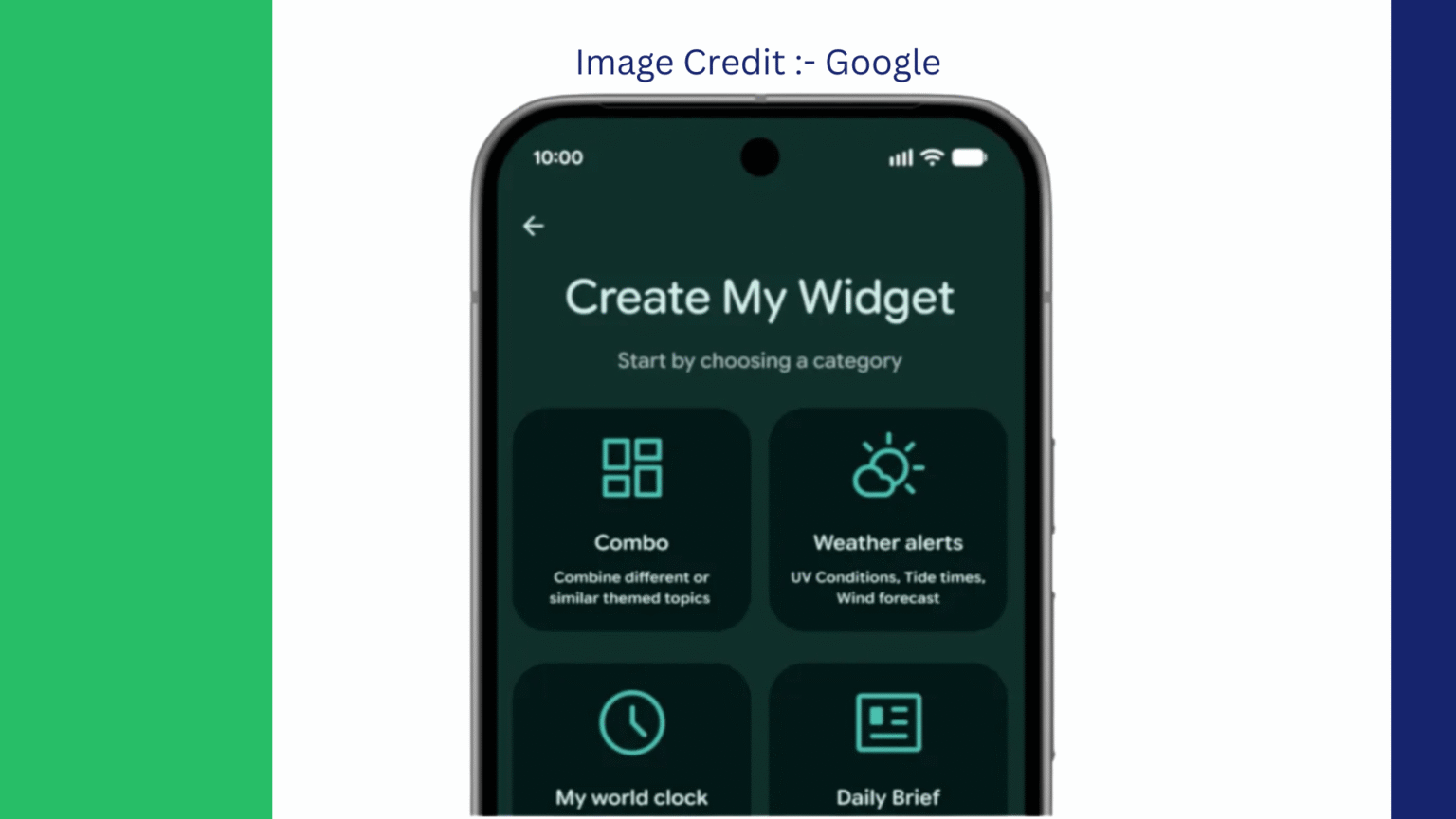
Additionally, Android 17 introduces Create My Widget which enables users to create custom widgets for their home screen with a simple natural language prompt.
The users do not choose their widgets from a fixed list of widgets, instead they simply tell the system what they want.
Examples include:
Fitness widget to promote cycling weather information.
High protein diet plan that includes meal plans.
Local events dashboard with upcoming concerts.
Widget that shows productivity for calendar events and task reminders.
This widget is automatically built and configured by the Gemini Intelligence.
The feature is a reflection of the growing trend of AI-powered interfaces that adjust dynamically according to individual needs and requirements instead of relying on fixed templates.
Select Galaxy smartphones and Pixel smartphones will be the first to receive Create My Widget.
8. Extende Gemini Task Automation
Google is making a major leap forward in the AI automation of Android with increased support for Task Automation with Gemini.
With the feature, AI agents can perform tasks in several applications on behalf of users.
Today services like ride-sharing and food delivery can be accommodated. Android 17 takes this one step further, allowing for even more elaborate processes.
Examples include:
Making food purchase plans from personal notes.
Creating Travel Itinerary based on pictures or screenshots.
Reservations and appointments.
Auto-coordination of tasks across applications.
Instead of just responding to queries, Gemini is now moving towards becoming a more hands-on assistant that can perform real-world tasks.
Google has yet to reveal an exhaustive list of supported apps, but says there will be significant growth during the year.
9. Enhanced Security and Theft Protection
One of the key priorities for Android 17 is security.
The update adds a number of new measures to fight scams, malware and to prevent unauthorized access and device theft.
Improvements include:
Scam Prevention
Google is also working with financial institutions to prevent fraudulent calls that mimic bank telephone numbers. Android is able to detect and block some types of impersonation attacks when user-supported banking apps are present.
Advanced Malware Detection
Android 17 has a more aggressive application monitoring with detection of suspicious activities such as:
- Unauthorized SMS forwarding
- Hidden background execution
- Unusual permission requests
- Potential spyware behavior
Also, now Chrome Safe Browsing will check downloaded APK installation packages against known malware databases before installation.
Enhanced Theft Protection
A user can set biometric protection requirements remotely, using the Find Hub lost device feature.
Google is also capping the number of times the password and PIN can be guessed, and lengthening the wait between failed authentication attempts, which significantly makes brute force attacks more difficult.
These enhancements give extra protection for delicate private data in case of loss or theft of the device.
Looking Ahead
Google’s Android 17 mobile operating system update is one of its most ambitious in recent years. Artificial intelligence is at the heart of the release, with additions such as Rambler, Create My Widget, and Gemini Task Automation, but other key points include Google’s steadfast commitment to privacy, security, digital well-being, and cross-platform functionality.
Android 17 promises to be more than just AI flair, with significant enhancements across various areas, such as smarter voice input and customizable widgets, along with potential improvements in file sharing and anti-theft measures.
The majority of the main features will be available via the update in the summer and later this year, usually with the Google Pixel first and then Android devices.