
With the intensifying competition in the browser market, Chrome is launching new productivity oriented features. With the AI firms and ambitious startups scrambling to reinvent how we browse the web, the World’s largest browser, Google Chrome, is fighting back. Responding to the increasing competition and evolving user demands, Google has officially introduced three new features that may enhance the everyday productivity: Split View, PDF Annotation, and Save to Google Drive. These additions are not specifically focused on artificial intelligence, but they indicate a wider approach of ensuring that Chrome is better integrated in the Google ecosystem and more helpful in the workflow.
It is no longer speed and simplicity when it comes to the browser wars. Browsers today are transforming into productivity platforms, research assistants and even AI workspaces. Firms such as OpenAI and Perplexity AI are working on agent-based browsing experiences, forcing more established players to move more quickly. Google, in its turn, has already made its AI assistant, Gemini, an in-built part of Chrome. Nevertheless, recent changes concentrate more on the practical additions which can make users interact with the content in their everyday life than the new AI-based features.
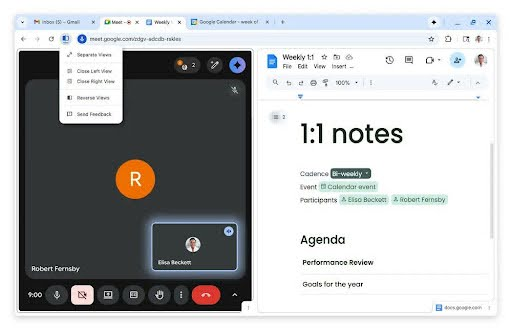
The Split View feature is one of the most important ones to add. Multitasking has become part of the way individuals utilize the browsers be it comparing documents, referencing research in the course of writing, shopping on several websites or watching a tutorial as one takes notes. Split View lets one open two web pages in a single browser window and the user can view both sides of the pages without always having to toggle between the tabs. This aspect makes workflow easier and less frictional in cases where numerous tasks are performed at the same time.
Split View is easy to use. A user may move a tab to the left or right side of the browser window or by right- clicking on a link, one may choose the Open link in split view option. The tabs are automatically organized as a dual-pane format in the browser. Once the user has finished, one can leave Split View by a simple right-click option and go back to the usual tab arrangement. Chrome makes the process of multitasking easier and more aware, which is why the product is more aligned with the needs of students, professionals, and researchers who rely on the efficient browsing experience.
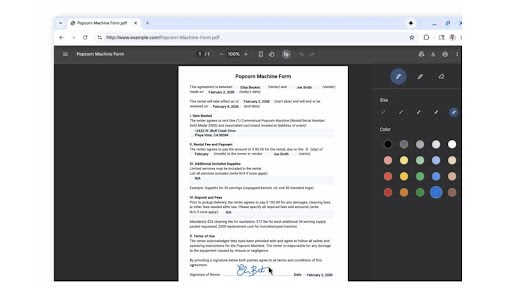
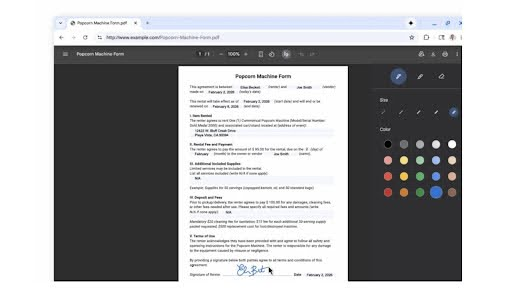
The other addition that is practical and highly anticipated is an addition of PDF Annotation. Users have over the years been using third party applications in order to edit or even annotate PDF files. Chrome is now capable of highlighting text, as well as adding notes and interacting with PDF files with the browser. This does not require one to download a document and use a separate software to perform basic editing tasks.
The advantages are enormous. Speaking of digital documents, forms, the review of contracts, or comments to academic content, users are now able to do it without leaving Chrome. This integration saves time as well as minimizes the time wastage due to switching between applications. To some users that are regular users, Chrome is already the core of the digital being; allowing interaction on PDFs in-browser only helps to solidify that cause.
The third aspect, Save to Google Drive, enhances once again the relationship between Chrome and the other Google system. Users can now store PDFs directly on their Google Drive account instead of storing them on a local computer where they can be lost or hidden. Saved files in this manner will automatically be placed in a specific folder of saved files in Chrome in Drive which can be accessed later easily.
This is a wider adoption and use of cloud-based storage and collaboration. Google ensures a more smooth flow of work between browsing, document management, and cloud storage by encouraging users to save files to Drive, as well. It also minimizes device specific storage which is highly helpful to users who often swap laptops, desktops and mobile devices
These additions are a few months after Google added Gemini and other AI-based functionalities to Chromebook users. Although the importance of AI as a strategic focus cannot be ignored, the recent changes of Chrome focus on the underlying productivity improvements. Instead of having futuristic AI capabilities, Google is improving the utilities that millions of users use on an everyday basis.
In the future, Chrome is also gearing to support vertical tabs, an option that has become a popular feature amongst the users who have many open tabs. Vertical tabs keep the browser tabs on the side of the screen rather than on the top of the screen which is much easier when dealing with long browsing sessions. This design, in particular, was popularized by Arc, created by The Browser Company and is also present in its AI-oriented browser, Dia.
This imitation produces an impression that Google is monitoring the user behavior and innovation by its rivals very closely. The intention is obvious: minimize the causes why users would go to other browsers. When the variation within a market is gradually depending on the efficiency of the workflow and artificial intelligence service, to maintain the loyalty of the user, one must constantly adapt.
Customers are in a new stage of web browsing with the present wave of innovation in the browser market. The browsers are no longer the passive entry to the websites but they are turning into a productivity platform. Split View, PDF Annotation, and Save to Google Drive are all offering Chrome a more solid standing not only as a browser, but also as one of the main desktops.
With the increased competition among browsers, these small, but still significant, improvements can be the difference between the success of an improvement and the failure of a headline-grabbing AI feature. With its emphasis on usability, integration and multitasking, Google Chrome is building its supremacy as it ushers into the next phase of the browser wars.