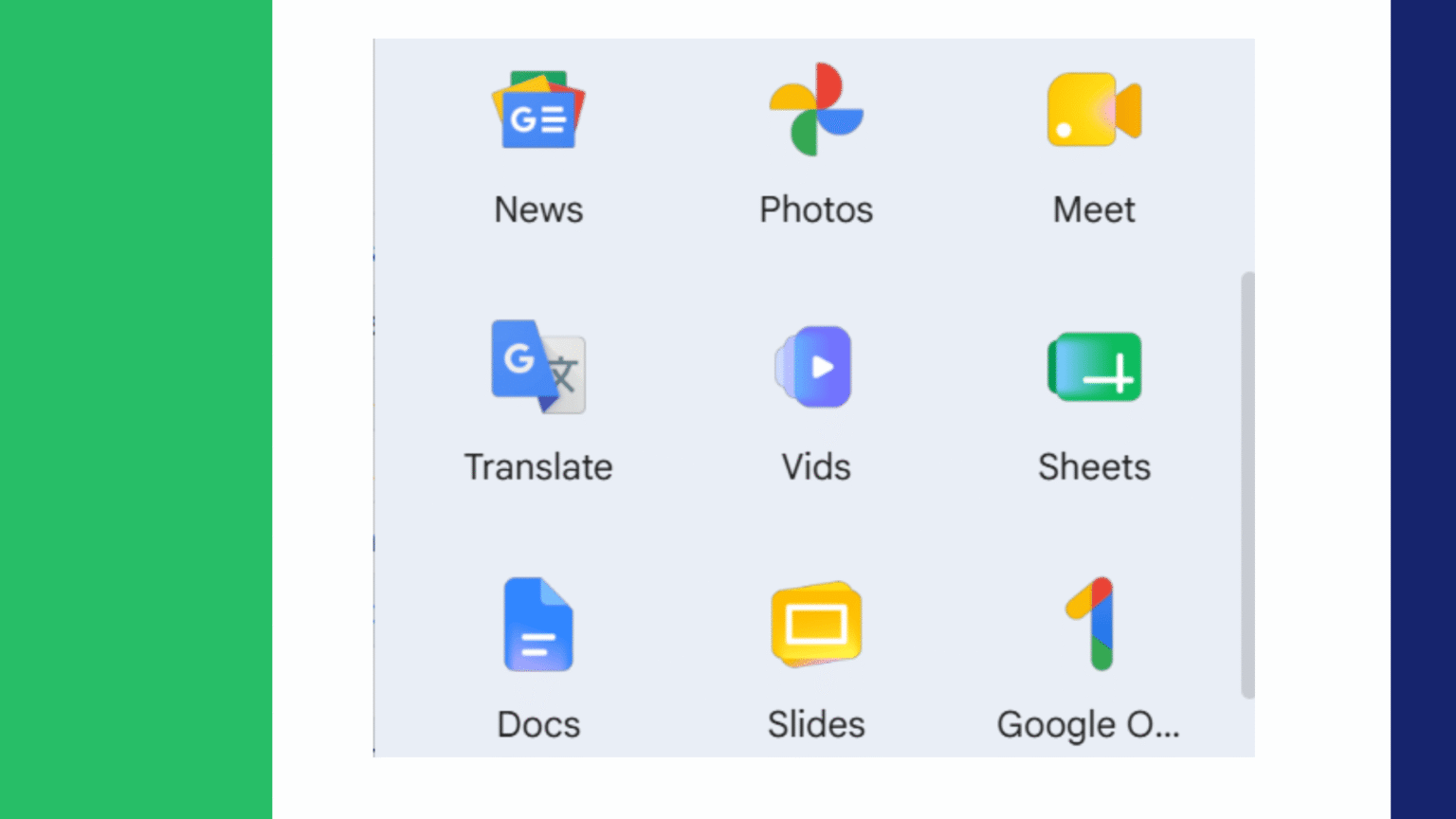


Google has officially started rolling out a new suite of icons for its Workspace products, giving them a more modern look and feel that falls in line with Google’s overall design changes. Many of Google’s popular productivity apps, such as Gmail, Drive, Calendar, Docs, Sheets, Slides, Meet, Google Chat, and Google Keep, have been updated with a cleaner look that features new gradients, shapes, and more uniform visuals.
The redesign comes ahead of Google’s annual I/O developer conference, where the company is rumored to reveal more changes to its software suite, AI projects and UX enhancements.
This is a new design language created using a gradient
The biggest difference between the new Workspace icons and the old ones is the addition of gradient color effects. The new icons are different from the old flat-color icons, which were monotone, and now have smooth transitions between lighter and darker colors.
The move is a similar strategy to the one Google used last year to redesign its main brand logo, and is indicative of a more dynamic and layered design language that the company is implementing across the Google product suite.
The gradients add depth and dimension and retain the colors that users have linked to each particular application. The outcome is a more contemporary look while maintaining the overall image and identity of the previous decade.
Improved Visual Differentiation
It seems like one of the things Google wants to do with the redesign is to make it more obvious to distinguish between apps.
Some of these icons over the years received similar rainbow-like color schemes, leading some users to struggle to distinguish between the Apps with a single glance. Multiple colors and similar visual structures were often used in applications like Google Meet, Google Chat and Google Calendar.
With the new redesign, this problem is corrected by giving more power to a few applications such as primary colors. Some icons have stopped using rainbow combinations and adopted more specific colors.
For example:
Google Chat has been given a newfound green hue.
Google Meet has a more transparent blue theme.
Google Calendar’s blue color is more noticeable.
Other Workspace applications keep the same colors, but add gradient effects.
Some of these modifications could improve users’ ability to find apps faster on home screens and desktops, though some longtime users might require some time to get used to the different visual cues.
Popular and elegant icons for DOC, SHEET and SLIDE files.
Not all of the applications got a makeover.
Much of the traditional color scheme and familiar document-style design of Google Docs, Sheets, and Slides remain the same. But there are subtle refinements that enhance consistency with the rest of the Workspace family.
There is one special change that impacts Sheets and Slides. They are now in landscape format, instead of being portrait icons. This change result in a different view of spreadsheets and presentations in real world use.
While it’s a minor change, it will make the visual identity of these apps more appropriate with their main purpose.
One of the Largest Updates to Google Drive
Google Drive is one of the most thorough revamped Workspace applications.
The well-known triangle Drive logo is still retained, retaining the brand recognition, however there are a few key visual modifications:
Rounded corners produce a softer look.
Gradient shading adds depth.
The small red accent that used to be in the lower-right part has been eliminated.
Overall Proportions have been improved for modern Android and web design.
The new Drive symbol looks more sleek and modern, but still has the familiar shape people would recognize for Google’s cloud storage service.
Google Keep gets a minimalist identity
Maybe the most dramatic change is to Google Keep.
The Keep logo was previously a yellow note square with a light bulb symbol. Google has streamlined the icon in the new design.
The yellow rectangular background has been completely eliminated and the only visual symbol is the light bulb that stands alone.
The minimalist look-and-feel gets rid of the clutter and helps Keep follow the simplified design strategy followed by many mobile applications.
But, if you have been a longtime user, you may need to adjust to the change because you have been associating the square yellow note shape with Keep for years, not the bulb.
Gmail Sports a Cleaner Refresh
There are subtle improvements for Google’s popular email service, too.
The Gmail logo is still fairly similar, maintaining its envelope-inspired “M” shape which is one of Google’s most recognizable symbols.
The redesign is not about reinvention, but refinement:
- Cleaner line work.
- More balanced proportions.
- Gradient color transitions.
- Better visual cohesion with the other part of the Workspace family.
With millions of users across the world using Gmail, the designers must have taken into account the need to maintain familiarity when redesigning the application.
Modernisation and Recognition in Balance
For big tech companies, redesigning app icons is a special problem.
People use application icons every day and often don’t read the name of the app. What might seem like minor shifts can at first be unsettling.
Google seem to have gone the safe route and kept the shape of most of the icons unchanged whilst introducing updated colors, proportions and effects.
The approach enables your users to spot familiar apps and slowly get used to Google’s new design language.
Newer users may find the new icons to be more consistent and modern. However, if you already use Workspace, it may take a bit of practice to get used to the new look.
Google’s Broader Visual Evolution is part of the solution
This isn’t the only change happening to the Workspace.
Google has been gradually changing its visual branding over the last few years on a variety of its products, including Android, Search, Chrome, Google Gemini, and Google Workspace. The company has come to favour increasing:
- Dynamic gradients
- Softer shapes
- More depth and dimension
- Improved accessibility
Improved visual consistency across platforms
These design changes align with Google’s vision of producing a consistent experience throughout desktop, mobile, web and AI-powered services.
With the increasing integration of artificial intelligence into Google products, it is essential to have a unified visual style, both for user-friendliness and for brand identity.
Looking Ahead to Google I/O 2026
The timing of the rollout of the Workspace icon is unlikely to be coincidental.
As rolls out, Google is likely to release more enhancements throughout its ecosystem, ranging from new capabilities of Gemini AI, Android updates, Workspace improvements for productivity, and user interface tweaks.
The revamped deal symbols could be the part of a more common overhaul of the whole of Google’s application suite.
The rollout of the new Workspace icons to users marks another step in Google’s ongoing efforts to modernize its offerings and prepare for the future, which is expected to be more AI-driven.
Although some users will find it easier to adjust to the changes than others, the redesign shows Google’s resolve to develop its ecosystem as it should, while maintaining the sense of familiarity that makes Workspace one of the most popular productivity suites in the world.